Showing posts with label Apple. Show all posts

Thursday, December 19, 2013

Mickey Mouse: Mash-Up - App Review

 By: Nick


If you've seen the new Mickey Mouse cartoons Disney has released recently, you'll know that they are very clever.

The Mickey Mouse: Mash Up app for iPhone, iPad and iPod gives you the opportunity to be as clever as the Disney animators, because YOU get to help Mickey Mouse complete one of the cartoons, "No Service."


Mickey asks for your help, inviting you to draw something large you would find at the beach.


I drew a sand pail.


Now it's time to color it in.


It's going to sound like I'm making excuses, because I am, but this app is probably great on an iPad, as drawing and coloring is much more difficult on an iPhone, which is what I'm using here. But artistic skills aside, this is fun regardless, and you can always start over by using the icon in the upper right hand corner. Just click on that...


... to be brought to the menu, where you can choose a point to go back or forward to.


You are then invited to draw something small you'd find on the beach,  and something silly for Mickey to wear.


All these drawings will be used later in the cartoon!

As the cartoon progresses, you are asked to contribute new illustrations.


 For instance, the sign needs to be completed with a food item. The drawing by me? A hotdog.


In addition to drawing activities, there are interactive games throughout. Here, I'm picking a feather I'll use to tickle Donald with!


\

Why is Mickey naked? Spoilers! You'll be using your drawings from earlier to help Mickey out of a tricky spot!

There is plenty to entertain both young and old here, with appearances from Goofy, Minnie Mouse and Daisy Duck.

At the end Mickey thanks you for helping finish his cartoon, and invites you to celebrate by drawing a picture of him, either using a template to draw over, or a blank page to draw from memory.


You can even view past mouseterpieces.


The app is $3.99 and lots of fun, with plenty of potential. I'm assuming Disney will be adding additional animated shorts in the future, adding to the re-playability.

We would like to thank Disney Publishing for providing this App for review.

Monday, November 25, 2013

Sophia the First: The Floating Palace App Reveiw

 By: Barbie

Sophia the First: The Floating Palace App is designed for the iPhone and iPad and little girls who love mermaids!
Join Sophia and find out how she can swim with the mermaids underwater! Everyone's favorite mermaid, Arial, even makes a cameo appearance!

Read along with Sophia from her book. Then make movies with her and her mermaid friends using different backdrops. You'll be able to move the characters around to make your own movie which you can record to play over and over, or make new ones.


Sophia and her friends are adorable, the book illustrations are lovingly drawn and the voice over work is done so sweetly. I'm sure all little girls will find this app to be such fun. How could you not want to play mermaid under the sea with Sophia?


We'd like to thank Disney Publishing for providing this App for review.

Tuesday, November 19, 2013

Frozen: Storybook Deluxe App Review

Disney's newest Animated Feature film Frozen won't be out in the United States until November 27th, but you can get the Frozen: Storybook Deluxe, compatible with iPhone, iPad, and iPod touch, and optimized for iPhone 5, now!
The Frozen: Storybook Deluxe App is $6.99


In “Frozen,” fearless optimist Anna teams up with rugged mountain man Kristoff and his loyal reindeer Sven in an epic journey, encouraging Everest-like conditions, mystical trolls and a hilarious snowman named Olaf in a race to find Anna’s sister, Elsa, whose icy powers have trapped the kingdom of Arendelle in eternal winter.

The storybook features lovely illustrations, tappable animation, film quotes, a few surprises, and short clips from the actual film.


Be sure to tap around the illustrations.


Storytelling Options: Read on your own, record your own voice, or listen to the narration that accompanies this retelling of Frozen.


Experience two sides of the story from Anna's or Elsa's viewpoint by rotating your i-devise!


As for games:
You can create your own snowflakes and ice castles with frosty drawing tools, then insert the image into a snow-globe scene, which is what I did here with a rather rudimentary castle drawing!


I have to be honest, I could only figure out how to insert the castle, and not, say, this snowflake I made.


In the puzzles section, match the shapes to those on the left, and drag them over to remove them, revealing the illustration.


 Games can be accessed from within the story as well by clicking either the snowglobe or puzzle icon when they appear.


I didn't know anything about this story. It's beautiful. The animation, the music, the story. Beautiful.

Obviously, if you don't want to know too much about the movie "Frozen" before seeing it, you may want to wait until after it's release to read the story. But in the meantime, you can enjoy the games.

Disney Musings would like to thank Disney Publishing for providing this app for review.

Thursday, October 17, 2013

Jake's Never Land Shapes and Patterns : App Review

By Nick:

I just got back from an adventure with Jake and his crew, and we learned about shapes!

Disney recently released the Jake's Never Land Shapes and Patterns App for iPhone and iPad.


Start your voyage by tapping on where you'd like to begin.


Twilight Treasure Hunt tells a story about a treasure map, interweaving Jake's Shape Games.


Either follow along with the story, or go right to the games, which include Matching Shapes.
Drag the shapes that Jake has made to the rock.


Pirate Patterns is a little more advanced, as you are picking up on patterns. Add the shape that would come next in sequence.


Shape Tracing has your child both finding missing shapes to complete a pattern, it then asks them to draw the shapes with the help of Brtightly, the firefly.


Your reward for playing games is gold doubloons, and new outfits for your pirate puppet!


Tap on Pirate Puppets on the home screen to choose and customize your own puppet.


You can even add a photo!


You can choose not to add a picture, but, of course, I did.


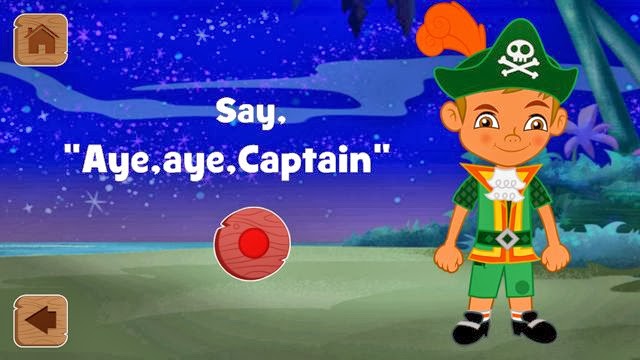
Here, you speak the pirate phrase for playback later.


Choose one of 3 songs to accompany you and your dance! 


The final result is a pirate jig with a recorded pirate message thrown in for good measure!


If your young one loves Jake and the Never Land Pirates, and you are teaching them shapes, I can't think of a better combo than this app to hold their interest and educate and entertain them at the same time.

Disney Musings would like to thank Disney Publishing Worldwide for providing this app for review.

Friday, August 2, 2013

Disney Princess Royal Salon : App Review


Disney has done it again, with another wonderful app for iPhone and iPad. Nick decided to let me review this one, as it is a very princess oriented app. First you pick your princess, Cinderella, Belle, Ariel, or Rapunzel.
 

Then you chose her invitation from four envelopes, and then dress her for whichever wonderful event you have chosen.


During the process of dressing, you can change the hair on your princess to any style you want. You can choose her outfit and color of her dress to any color of the rainbow by dragging your finger over the heart. You can even take a picture of your own pattern for your princesses dress! The pink and white checked dress in the photo below on the left is one of our sheets in fact! Different cloth patterns, dress styles, colors, the options are endless.


Now you go on to accessorize her outfit with jewelry, hats, flowers etc, and if you don't like what you've chosen, just swipe it off and it disappears.

By hitting the castle in the upper left you can start again with a new princess! The book in the upper right corner takes you to your photo album.


 This is like electronic paper dolls, but so much better, with awesome music, some narration and options beyond belief. (Oh, and by the way, Nick grabbed the phone from me and wouldn't give it back, he was having so much fun!)

Thanks to Disney Publishing Worldwide for providing this app for review. Click here to get it on iTunes.